

Why OIG Exclusion Screening Software Is a Compliance Non-Negotiable for Healthcare Employers

OIG exclusion screening software automates the process of checking employees, contractors, and vendors against federal and state exclusion lists — so your organization doesn't accidentally employ someone who is legally barred from participating in Medicare, Medicaid, or other federally funded healthcare programs.
Quick answer: What does OIG exclusion screening software do?
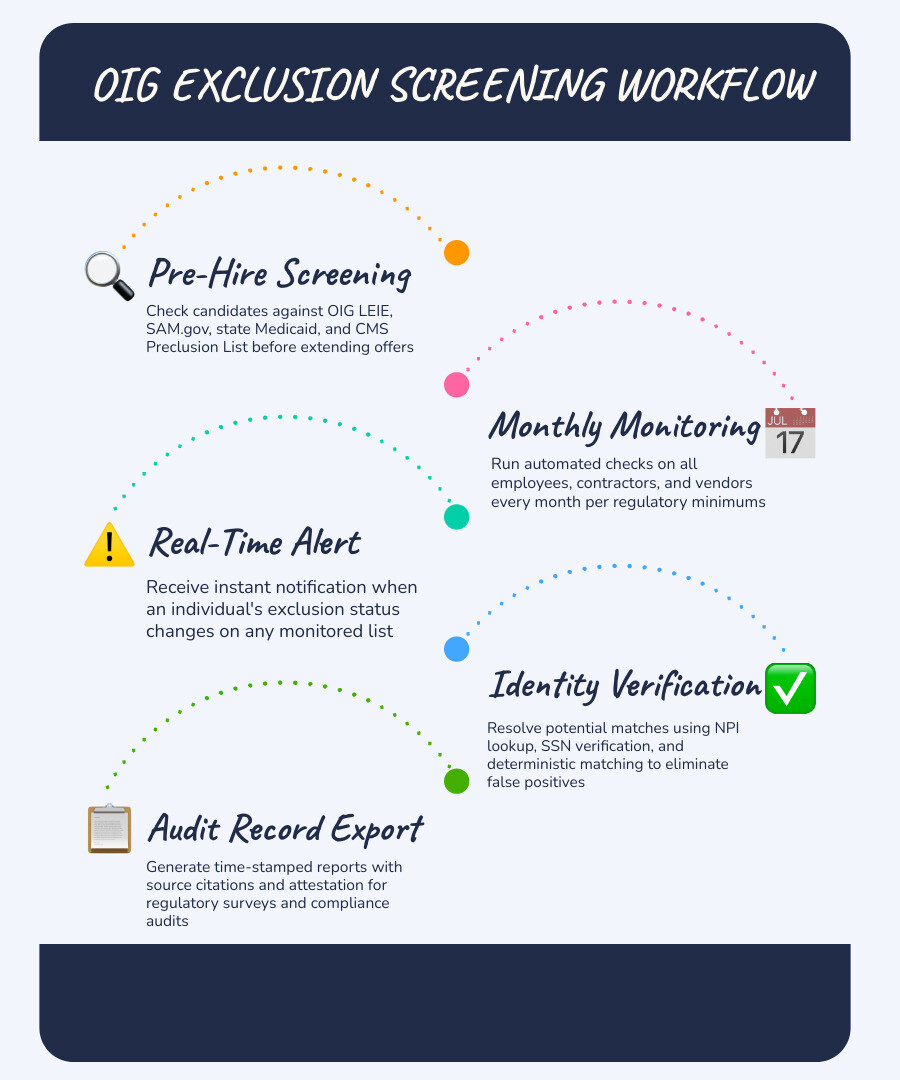
- Screens your workforce against the HHS OIG List of Excluded Individuals/Entities (LEIE) and other key databases
- Runs checks automatically on a monthly cadence, aligned with OIG guidance that recommends monthly LEIE screening
- Alerts your team when an employee's or vendor's exclusion status changes
- Produces time-stamped, audit-ready records of every screening event
- Reduces the manual burden of checking multiple federal and state databases separately
The stakes are high. Hiring or retaining an excluded individual — even unknowingly — can expose your organization to civil monetary penalties starting at a statutory base of $10,000 per item or service, adjusted annually for inflation, plus assessments of up to three times the amount claimed. Ignorance of an employee's excluded status is not a reliable compliance defense.
And the complexity is real. Your compliance team isn't just checking one list. Between the OIG LEIE, SAM.gov, more than 40 state-maintained Medicaid exclusion lists, the CMS Preclusion List, and others, there are many sources to monitor — each updated on its own schedule. Doing that manually every month, for every employee and vendor, is where programs break down.
That's exactly the problem purpose-built exclusion screening software is designed to solve.
Understanding OIG Exclusions and the Legal Mandate for Healthcare Employers
To build an effective compliance program in 2026, you must first understand the legal framework that governs healthcare exclusions. The Office of Inspector General (OIG) has the authority to exclude individuals and entities from participation in federally funded healthcare programs. Under Sections 1128 and 1128A of the Social Security Act, any healthcare provider that receives Medicare, Medicaid, or CHIP reimbursement is prohibited from hiring or contracting with an excluded party for items or services payable by federal healthcare programs.
When an individual or entity is placed on the HHS OIG Exclusions Program list, no federal healthcare program payment can be made for any items or services they furnish, order, or prescribe. This restriction applies not only to direct clinical care but also to administrative, billing, and support services.
If your organization submits a claim that involves an excluded individual, you may face False Claims Act liability. This can trigger civil monetary penalties starting at a statutory base of $10,000 per item or service, adjusted annually for inflation, plus assessments of up to three times the amount claimed. To understand how these requirements fit into your broader pre-employment screening process, consult our guide on Healthcare Background Checks: A Complete Guide to Requirements, Compliance, and Best Practices.
Mandatory vs Permissive Exclusions
The OIG categorizes exclusions into two primary types, each carrying different legal implications and durations:
- Mandatory Exclusions: By law, the OIG must exclude individuals convicted of Medicare or Medicaid fraud, patient abuse or neglect, felony convictions related to healthcare fraud, or felony convictions related to the unlawful manufacture, distribution, or dispensing of controlled substances. A first offense carries a mandatory minimum exclusion period of 5 years, a second offense requires 10 years, and a third offense results in a permanent exclusion.
- Permissive Exclusions: The OIG has the discretion to exclude individuals for misdemeanor convictions related to healthcare fraud, misdemeanor convictions related to controlled substances, license revocation or suspension by state medical boards, or defaulting on health education assistance loans. Permissive exclusions typically vary based on the exclusion authority, the facts of the case, and the OIG's determination.
Crucially, reinstatement is never automatic. Even after the designated exclusion period ends, the individual must formally apply for and receive written reinstatement from the OIG before they can legally work for a federally funded healthcare provider again.
Who Must Be Screened
A common compliance misconception is that exclusion screening only applies to licensed clinical professionals like physicians and nurses. In reality, the mandate extends to your entire workforce. You must screen:
- Licensed Providers: Physicians, nurse practitioners, physician assistants, registered nurses, and therapists.
- Administrative and Support Staff: Billers, coders, receptionists, IT professionals, managers, and executives who do not have direct patient contact but support the business operations.
- Third-Party Vendors and Contractors: Medical equipment suppliers, IT consultants, external billing agencies, and even contracted transportation or laundry services.
If an excluded individual is involved in any capacity with a service or item that is ultimately billed to a federal program, your organization is exposed to severe financial and legal liabilities.
Key Features to Evaluate in OIG Exclusion Screening Software
Managing this scope manually is nearly impossible for modern HR and compliance teams. When selecting OIG exclusion screening software, you need a solution that goes beyond basic database searches to provide robust, automated risk mitigation.

For a deeper look at how screening integrates with your overall HR workflow, read about Healthcare Sanctions Monitoring for HR.
Multi-List Coverage and Data Freshness
The OIG LEIE is the primary federal exclusion list, but it is not the only database you must monitor. To maintain complete compliance, your software should support multi-source verification across thousands of federal, state, and licensing-board primary sources, including:
- The OIG LEIE: Updated monthly with all active federal exclusions.
- The GSA System for Award Management ( SAM.gov): This source tracks individuals and entities excluded from receiving certain federal contracts, assistance, and benefits.
- State Medicaid Exclusion Lists: More than 40 state-maintained Medicaid exclusion lists can create additional monitoring obligations. Under Section 6501 of the Affordable Care Act, an individual excluded from Medicaid in one state is generally prohibited from participating in Medicaid in all other states. Because state-level updates and federal reporting can occur on different timelines, healthcare organizations should monitor state-maintained Medicaid exclusion lists as part of a broader screening program.
- Additional Sanction and Credential Sources: FDA debarment information, DEA registration status checks, OFAC sanctions data, and relevant licensing-board primary sources.
Your software should refresh its data promptly after source-list releases. This helps ensure you are screening against current compliance datasets rather than stale exports.
Identity Verification and False Positive Resolution
One of the biggest operational challenges of exclusion screening is managing false positives. Common names can trigger multiple potential matches across federal and state databases.
High-quality exclusion screening software solves this issue by utilizing advanced identity verification techniques:
- Deterministic NPI Matching: Using National Provider Identifier (NPI) numbers for exact-match triage, bypassing name-matching issues entirely for licensed providers.
- Fuzzy Name Matching: Automatically checking name variations, maiden names, combined names, and common diminutives to prevent excluded individuals from slipping through the cracks under an alternate alias.
- Multi-Factor Verification: Cross-referencing matching names with secondary identifiers such as Date of Birth (DOB), address history, and Social Security Numbers (SSN).
- False-Positive Caching: Once your compliance team verifies that a potential match is a false positive, the software should cache that specific combination of employee and record. This ensures the same false match does not reappear in future monthly runs, saving your team repetitive review.
How Automated Software Solves the Challenges of Manual Screening
Relying on manual spreadsheets and individual website lookups is a recipe for compliance failure. To understand why, consider how manual processes compare to automated OIG exclusion screening software:
| Compliance Challenge | Manual Screening Approach | Automated Software Solution |
|---|---|---|
| Search Scope | Staff must manually check multiple federal and state websites for every employee. | A single automated run screens your workforce across federal and state exclusion sources simultaneously. |
| Cadence & Consistency | Checks are often performed only at hire, or missed during busy months. | Scheduled monthly monitoring runs automatically in the background. |
| False Positive Management | HR must manually research and document common-name matches, month after month. | Smart algorithms filter likely mismatches, and false-positive caching prevents duplicate reviews. |
| Audit Trails | Teams rely on paper printouts or scattered screenshots of search results, which are easily lost. | The system generates centralized, time-stamped, and source-cited digital records of every check. |
Managing this ongoing burden is critical to protecting your business. To explore the broader benefits of continuous oversight, check out our guide on Continuous Background Monitoring for Employers.
Workload Reduction and Time Savings
Automating your screening processes yields meaningful operational efficiencies. Healthcare organizations that transition from manual checks to automated screening platforms can reduce repetitive administrative work for HR, credentialing, and compliance teams. Instead of logging into multiple portals, typing names, and saving screenshots, your teams only need to interact with the software when a legitimate, high-probability match triggers an alert.
This reduction in administrative overhead allows your staff to focus on higher-value tasks, such as onboarding new hires faster and managing active credentials.
Maintaining Audit-Ready Compliance Records
During a state survey, CMS audit, or payer review, you must prove that you have performed consistent exclusion checks on members of your workforce. Simply stating that you run these checks is not enough; you must provide evidence.
Automated software ensures you are always audit-ready by generating a dated, source-cited record for every single screening event. Each record should contain:
- The exact date and time the search was conducted.
- The specific databases searched.
- The snapshot date of the source data used.
- The methodology version and unique transaction ID.
- A clean, downloadable attestation file that you can provide during audits or reviews.
Frequently Asked Questions About OIG Exclusion Screening Software
Managing exclusions involves navigating complex federal regulations. Here are answers to the most common questions healthcare HR leaders ask when evaluating software solutions.
How does OIG exclusion screening software handle the CMS Preclusion List?
The CMS Preclusion List is distinct from the OIG LEIE, though they have significant operational overlap. Maintained by the Centers for Medicare & Medicaid Services, the Preclusion List contains providers and entities that are debarred from Medicare enrollment, have had their billing privileges revoked, or have engaged in behavior that threatens program integrity.
While the OIG LEIE bars individuals from any participation in federal healthcare programs, the CMS Preclusion List specifically prevents Medicare Advantage plans and Part D prescribers from paying for services ordered or furnished by those on the list. High-quality exclusion screening software integrates both the OIG LEIE and CMS Preclusion List information into a unified screening workflow, ensuring you do not have to manage separate tracking systems for these closely related compliance mandates.
How often should you run checks using OIG exclusion screening software?
You should screen employees, contractors, and vendors before hire or contract initiation and at least monthly thereafter, consistent with OIG guidance to screen the LEIE monthly.
Because the OIG updates the LEIE monthly, and state Medicaid programs publish updates on varying schedules, a one-time check at onboarding leaves a compliance gap. An employee could be added to an exclusion list after employment begins. Without recurring monthly screening, your organization may continue billing for services connected to an excluded individual before discovering the issue.
For staffing agencies and high-volume healthcare employers, maintaining this monthly cadence is vital. You can learn more about managing these high-volume compliance demands in our guide on Stay Alert with Continuous Monitoring for Staffing Agencies, and evaluate how ongoing checks differ from traditional methods in Continuous Criminal Monitoring vs One-Time Background Checks: What HR Leaders Need to Know.
What are the financial penalties for employing an excluded individual?
If your organization employs or contracts with an excluded individual who contributes directly or indirectly to federal healthcare program claims, you face severe financial consequences:
- Civil Monetary Penalties: civil monetary penalties starting at a statutory base of $10,000 per item or service, adjusted annually for inflation, plus assessments of up to three times the amount claimed.
- False Claims Act Exposure: Claims connected to excluded individuals may create False Claims Act liability depending on the facts and circumstances.
- Claim Denials and Overpayment Liability: You may need to refund payments received from Medicare or Medicaid for services or items involving the excluded person, even if the care provided was otherwise appropriate.
- Corporate Integrity Agreements (CIAs): Serious or systemic compliance failures can result in the OIG imposing a CIA, which subjects your organization to years of expensive, government-mandated oversight and external audits.
Conclusion
In 2026, manual OIG exclusion screening is no longer a viable option for healthcare employers, staffing agencies, or high-volume operations. The regulatory landscape is too complex, the state-level databases are too fragmented, and the financial exposure for a single oversight is too severe to rely on spreadsheets and manual search portals.
Implementing a dedicated OIG exclusion screening software solution protects your organization from costly penalties, ensures continuous compliance, and reduces the administrative burden on your HR and credentialing teams.
With VettyComply™, Vetty provides a streamlined approach to post-hire continuous monitoring. From a single, mobile-friendly dashboard, VettyComply™ supports monitoring for OIG LEIE, SAM.gov, state Medicaid lists, criminal records, and motor vehicle records. VettyVerify™ supports pre-hire background screening, while VettyOnboard™ supports onboarding, document collection, license verification, and e-signatures. Together, Vetty's PBSA-accredited, SOC 2 Type 2 certified platform helps HR and compliance teams manage screening, onboarding, and monitoring without assigning the wrong workflow to the wrong tool.
To streamline your compliance and protect your organization from costly penalties, get started with Vetty's automated monitoring solutions today by visiting Vetty's start page.