

What Is an OIG Exclusion Database Search (And How to Do It Fast)

An OIG exclusion database search is how healthcare employers verify that a candidate, employee, contractor, or vendor is not barred from participating in federally funded programs like Medicare and Medicaid. The database is called the List of Excluded Individuals/Entities (LEIE), and it's maintained by the HHS Office of Inspector General.
Navigating healthcare compliance in 2026 requires a rigorous, structured approach to screening. To help your organization stay fully compliant with US laws and regulations, this guide provides a comprehensive overview of the process, including a step-by-step FCRA Workflow, a stage-by-stage hiring breakdown, and a comparison of top screening solutions.
Compliance Checklist
- [ ] Verify full legal name and all known aliases (maiden names, hyphenated names).
- [ ] Collect and verify SSN (for individuals) or EIN (for entities).
- [ ] Search the OIG LEIE database prior to hire and monthly thereafter.
- [ ] Cross-reference results with SAM.gov and State Medicaid Exclusion Lists.
- [ ] Document all "No Results Found" or resolved "No System Match" screens for the audit trail.
- [ ] Follow a strict FCRA Workflow if utilizing a third-party consumer reporting agency.
Fair Credit Reporting Act (FCRA) Workflow
When using a third-party background check provider to run OIG exclusion searches, you must adhere to the FCRA:
- Disclosure: Provide the candidate with a standalone written disclosure that a background check will be conducted.
- Authorization: Obtain the candidate's written consent before running the search.
- Pre-Adverse Action: If a potential exclusion match is found and you plan to deny employment, send a Pre-Adverse Action notice, a copy of the report, and a summary of FCRA rights.
- Waiting Period: Allow a reasonable period (typically 5 business days) for the candidate to dispute any inaccuracies.
- Adverse Action: If the match is confirmed and unresolved, send a final Adverse Action notice.
How to Run a Search Right Now
- Go to exclusions.oig.hhs.gov
- Select "Individual" or "Entity" search
- Enter the person's name (use partial names for broader results)
- If you get a potential match, verify identity using their SSN or EIN in the online tool
- Document your search results with a screenshot for your audit trail
That's the core process. But there's more you need to know to stay compliant — including how often to search, what happens when you find a match, and which other databases you also need to check.
The stakes are real. Employing an excluded individual — even unknowingly — can result in civil monetary penalties starting at a statutory base of $10,000 per item or service, adjusted annually for inflation, plus assessments of up to three times the amount claimed. Ignorance of an employee's excluded status is not a legal defense.
For HR and compliance teams managing dozens or hundreds of employees, running these checks manually every month adds up fast. This guide walks you through the full process, the common mistakes, and how to build a screening workflow that actually holds up under audit.
What is the OIG LEIE and Why Does It Matter for Healthcare Compliance?
The List of Excluded Individuals/Entities (LEIE) is a national database managed by the HHS Office of Inspector General (OIG). It contains the names of individuals and businesses who are currently prohibited from participating in Medicare, Medicaid, and all other federal healthcare programs. When an individual is placed on this list, no payment can be made by any federal healthcare program for any items or services they furnish, order, or prescribe.
This payment ban is incredibly broad. It doesn't just apply to direct patient care. It covers administrative duties, billing, IT support, and even general clerical work. If an excluded individual’s salary or the services they provide are funded in any way by federal healthcare dollars, the employing organization is in direct violation of federal law.
The legal authority for these exclusions is established under Section 1128 of the Social Security Act. The OIG Exclusions Program classifies these actions into two primary categories:
Mandatory Exclusions
Under federal law, the OIG is required to exclude individuals or entities convicted of certain criminal offenses. These exclusions carry a mandatory minimum period of five years. A second mandatory offense increases the minimum exclusion to 10 years, and a third offense results in permanent exclusion. Mandatory exclusions are typically triggered by:
- Medicare or Medicaid fraud, as well as fraud related to any other federal or state healthcare program.
- Patient abuse or neglect in connection with the delivery of a healthcare item or service.
- Felony convictions related to healthcare fraud, theft, embezzlement, or financial misconduct.
- Felony convictions related to the unlawful manufacture, distribution, prescription, or dispensing of controlled substances.
Permissive Exclusions
The OIG has the discretionary authority to issue permissive exclusions for a wide variety of other infractions. The length of a permissive exclusion varies based on the severity of the offense, but a common baseline is three years. Permissive exclusions can be triggered by:
- Misdemeanor convictions related to healthcare fraud or controlled substances.
- The suspension, revocation, or surrender of a professional healthcare license due to competence, professional performance, or financial integrity.
- Defaulting on health education assistance loans or scholarship obligations.
- Submitting claims for excessive charges or medically unnecessary services.
- Unlawful kickback arrangements.
For HR leaders, navigating these regulations is a critical component of a broader compliance strategy. Incorporating these checks into your standard pre-hire workflow—as detailed in our Healthcare Background Checks Guide —protects your organization from severe legal and financial liabilities.
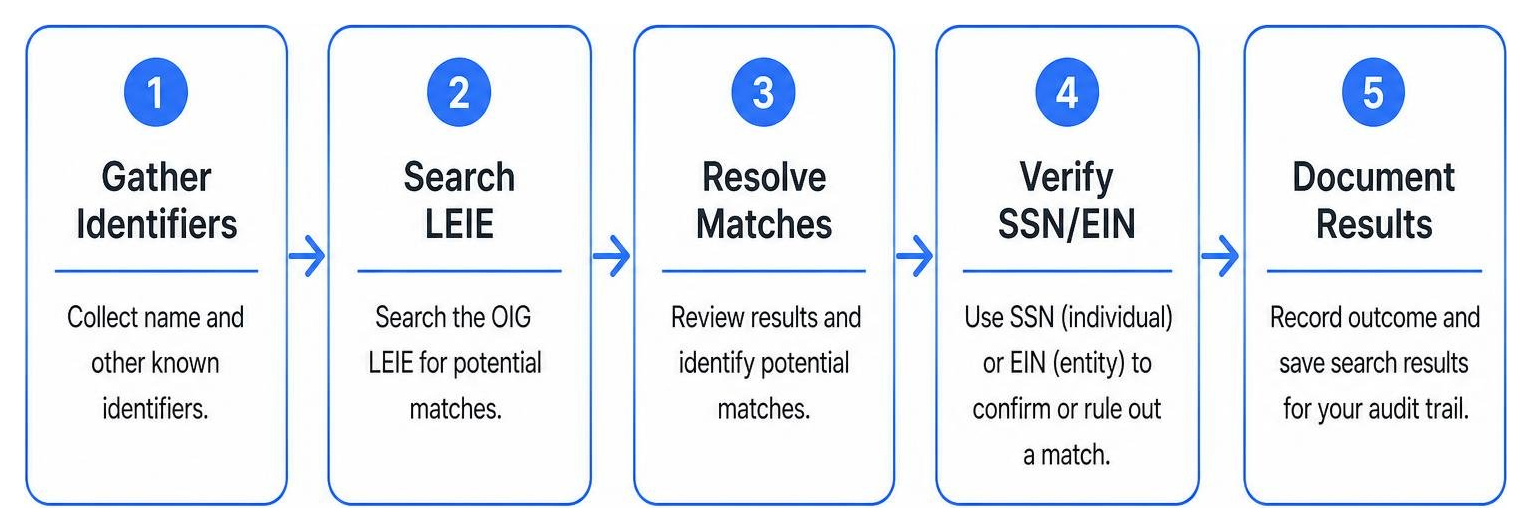
How to Perform an OIG Exclusion Database Search in 5 Steps
Performing a manual OIG exclusion database search requires careful attention to detail. Because the database contains tens of thousands of records, relying on a simple name search without proper verification can lead to costly compliance gaps or unnecessary administrative delays.
The OIG updates the LEIE every month, typically by the 10th to the 15th, reflecting all exclusion actions taken during the prior month. When conducting manual checks, you must follow a structured verification process to ensure no active exclusions are missed. The official LEIE Quick Tips & Instructions provide the administrative framework for these searches.
Stage-by-Stage Hiring Breakdown
- Stage 1: Sourcing & Application: Collect full legal names, aliases, and initial consent disclosures.
- Stage 2: Pre-Offer Screening: Run the initial OIG LEIE and SAM.gov searches alongside standard background checks.
- Stage 3: Onboarding & Credentialing: Verify SSN/EIN, NPI numbers, and professional licenses. Resolve any potential database matches.
- Stage 4: Active Employment: Transition the employee into a continuous monthly monitoring program to catch mid-tenure exclusions.
Common Mistakes to Avoid
- Searching only the OIG LEIE: Neglecting SAM.gov and state-specific Medicaid lists.
- Failing to search aliases: Missing exclusions listed under maiden names or hyphenated variations.
- Skipping monthly updates: Assuming a pre-employment check is sufficient for lifetime compliance.
- Incomplete documentation: Failing to save dated screenshots of "No Results Found" screens for audit trails.
Good vs. Bad Comparison
- Good Practice: Running automated monthly checks across OIG, SAM, and more than 40 state-maintained Medicaid exclusion lists, and automatically archiving dated, verified search certificates for every employee.
- Bad Practice: Manually typing names into the OIG website once a year, keeping no screenshots, and ignoring state-level Medicaid exclusion lists.
Step 1: Gather Accurate Candidate Identifiers for Your OIG Exclusion Database Search
Before you open the database, you must collect a complete set of verified identifiers for the individual or entity you are screening. Do not rely solely on the name provided on a standard resume. You should gather:
- Full Legal Name: First, middle, and last name.
- Date of Birth (DOB): Crucial for distinguishing between individuals with common names.
- Social Security Number (SSN): The ultimate identifier for individuals.
- Employer Identification Number (EIN): Necessary if you are screening a vendor, contractor, or corporate entity.
- National Provider Identifier (NPI): A unique 10-digit identification number for covered healthcare providers. While the OIG has included NPIs in the database since 2008, not all historical records contain one.
Additionally, you must account for name variations. Ensure you collect and screen former names, maiden names, hyphenated names, and common diminutives. For example, if a candidate's legal name is Jane Smith-Jones, you must run separate searches for "Jane Smith," "Jane Jones," and "Jane Smith-Jones" to ensure complete coverage.
Step 2: Choose Your Search Method (Online vs. Downloadable)
The OIG provides two primary ways to access the LEIE, depending on the volume of names you need to screen. You can access both options through the LEIE Database Downloads page.
- The Online Searchable Database: This web-based tool is ideal for screening a small number of individuals or entities. It allows you to search up to five names simultaneously. The primary advantage of the online tool is that it includes an active verification field where you can input an SSN or EIN to instantly confirm a match.
- The Downloadable Database: If you are screening a large workforce or roster of contractors, you can download the entire LEIE database as a CSV file. To keep your local system up to date, you must establish an update strategy: either download the complete, replaced database file every month, or download and append the monthly supplement files.
Note: Due to federal Privacy Act restrictions, the downloadable CSV file does not contain SSNs or EINs. If you identify a potential name match using the downloadable file, you must still return to the online searchable database to perform the final SSN/EIN verification.
Step 3: Execute the OIG Exclusion Database Search and Resolve Matches
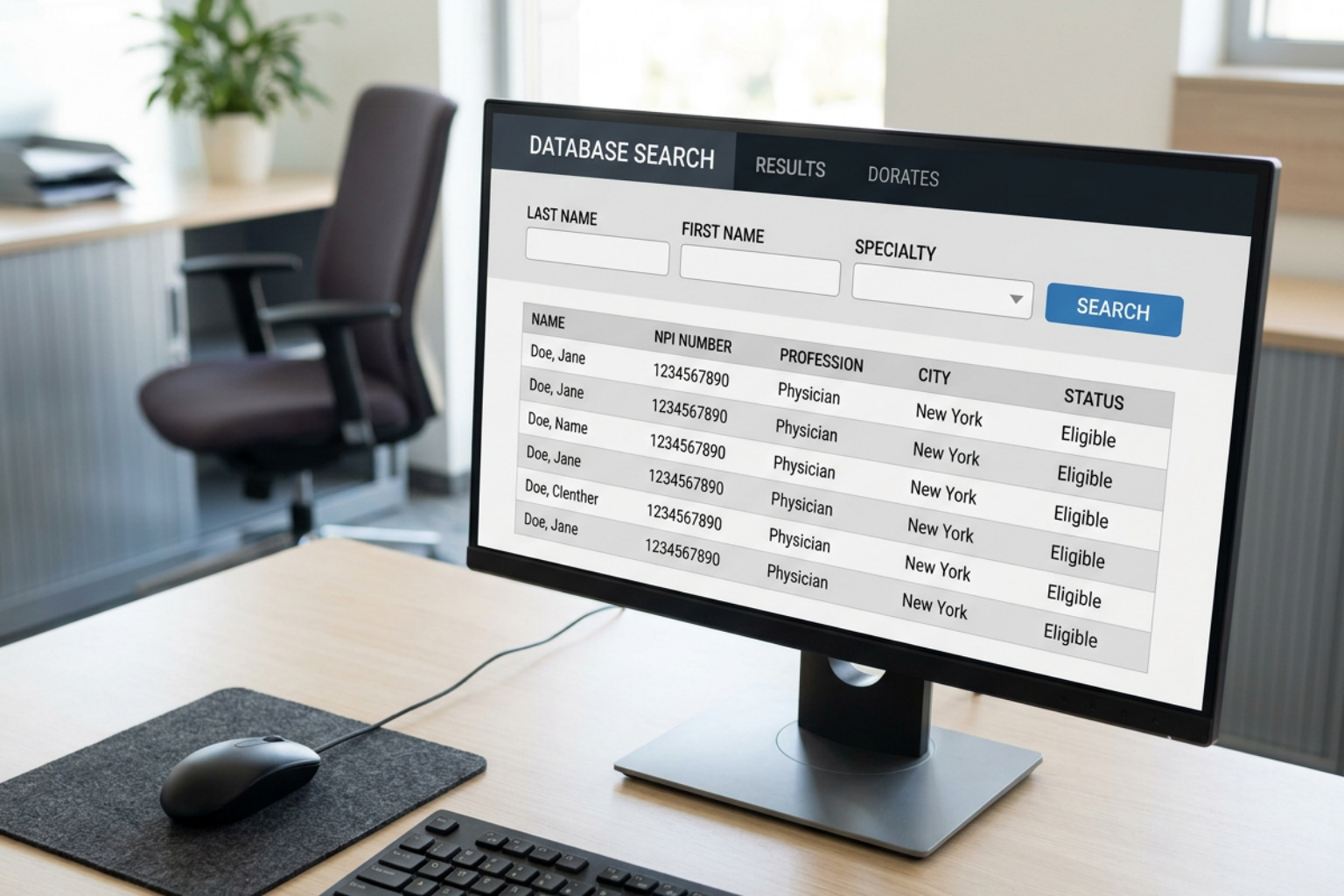
Once you have selected your method, execute the search. When using the online database, enter the last name and first name of the individual.
A common challenge during this step is handling partial name matches and false positives. If you search for a common name like "John Smith," the database will likely return multiple records. You must systematically compare your candidate's details (such as their state of residence, specialty, or DOB) against the search results.
If the initial details do not rule out a match, you must proceed to the next step. For a deeper look at managing these matches within your HR workflows, read our guide on Healthcare Sanctions Monitoring for HR.
Step 4: Verify Identity Using SSN or EIN
If your search returns a potential name match, you cannot assume the individual is excluded, nor can you ignore the result. You must perform a definitive identity verification.
In the online searchable database, click on the potential match's name. This will open a verification screen with a dedicated field for the SSN (for individuals) or EIN (for businesses). Enter the candidate's 9-digit ID number. The system will compare your input against the secure, non-public portion of the database and return a clear "System Match" or "No System Match" result.
If the system returns "No System Match," you have successfully resolved the false positive. If it returns a confirmed match, the individual is actively excluded, and you cannot employ them in any role funded by federal healthcare programs.
Step 5: Document Your Search Results for Audit Trails
In healthcare compliance, an unrecorded search is an unperformed search. State and federal auditors will expect you to provide clear, dated proof of your screening activities.
For every search you perform, you must document the results. If the search returns no matches, print or take a screenshot of the "No Results Found" screen. If you had to resolve a potential match using an SSN or EIN, take a screenshot of the "No System Match" confirmation screen. Save these files in the employee’s personnel record or your centralized compliance database, noting the date of the search and the name of the staff member who conducted it.
OIG LEIE vs. SAM.gov, CMS Preclusion, and State Medicaid Lists
A common compliance misconception is that checking the OIG LEIE is sufficient to meet all federal and state screening requirements. In reality, the LEIE is just one of several critical databases that healthcare organizations must monitor. Failing to screen against these other lists can expose your organization to significant penalties.
| Database | Managing Agency | Scope of Coverage | Key Characteristics |
|---|---|---|---|
| OIG LEIE | HHS Office of Inspector General | All federal healthcare programs (Medicare, Medicaid, CHIP, TRICARE). | Refreshed monthly; focused purely on healthcare-related exclusions. |
| SAM.gov | General Services Administration (GSA) | All federal procurement and non-procurement contracts and funding. | Covers debarments across all federal industries, including defense and education. |
| CMS Preclusion List | Centers for Medicare & Medicaid Services (CMS) | Medicare Advantage (Part C) and Medicare Prescription Drug Plans (Part D). | Contains providers who are precluded but not necessarily excluded by the OIG. |
| State Medicaid Lists | Individual State Medicaid Agencies | State-specific Medicaid programs and local funding. | Required under ACA Section 6501; states report data to the OIG with varying delays. |
System for Award Management (SAM.gov)
The GSA maintains the SAM database, which tracks entities and individuals who are debarred, suspended, or otherwise excluded from receiving any federal contracts, subcontracts, or financial assistance. While there is overlap between the LEIE and SAM, they are not identical. An individual debarred for a non-healthcare offense (such as defense contract fraud) will appear on SAM but not on the LEIE.
CMS Preclusion List
Created to protect Medicare beneficiaries, the CMS Preclusion List contains prescribers and providers who are prevented from receiving payment for Medicare Part C and Part D services. This list includes individuals who have engaged in behavior detrimental to Medicare, even if they have not yet gone through the formal OIG administrative exclusion process.
State Medicaid Exclusion Lists
Under Section 6501 of the Affordable Care Act, if an individual is excluded or terminated from participating in one state's Medicaid program, they are legally prohibited from participating in all other states' programs. Because there can be a significant administrative lag before a state-level exclusion is reported to and uploaded onto the federal LEIE, you must screen the individual Medicaid exclusion lists for any state in which your organization operates or draws talent.
To learn more about implementing a comprehensive, multi-list screening strategy for your workforce, explore our targeted Healthcare Solutions.
Frequently Asked Questions About OIG Exclusion Screening
How often should healthcare employers check the OIG exclusion list?
Healthcare employers must screen all employees, contractors, and vendors prior to hire or engagement, and at least once a month thereafter . Because the OIG updates the LEIE monthly, a one-time pre-employment check leaves your organization vulnerable if an employee is excluded during their tenure. Monthly screening is the recognized standard for federal and state compliance.
What are the penalties for employing an excluded individual?
The financial consequences are severe. Under Section 1128A of the Social Security Act, the OIG can impose civil monetary penalties starting at a statutory base of $10,000 per item or service, adjusted annually for inflation, plus assessments of up to three times the amount claimed. Additionally, your organization can face potential exclusion from participating in Medicare and Medicaid entirely.
Is reinstatement to the LEIE automatic after the exclusion period ends?
No, reinstatement is never automatic . Even if an individual was excluded for a specific term (such as a 5-year mandatory minimum), they remain actively excluded until they formally apply for and receive written approval for reinstatement from the OIG. Employing an individual whose exclusion period has expired, but who has not been formally reinstated, carries the same penalties as employing a newly excluded individual.
Streamlining Your Healthcare Compliance Workflows
For growing healthcare organizations, staffing agencies, and health systems, managing monthly manual database searches for hundreds or thousands of workers is an administrative bottleneck. The manual process is prone to human error, missed deadlines, and inconsistent documentation—risks that can quickly lead to failed audits and devastating fines.
Screening Solutions Comparison
| Feature / Capability | Vetty | Traditional Competitors |
|---|---|---|
| Continuous Monitoring | Automated monthly checks against OIG LEIE, SAM.gov, and more than 40 state Medicaid exclusion lists. | Often requires manual re-ordering or batch uploads each month. |
| Mobile-First Experience | Optimized for high-volume, smartphone-based verification (ideal for gig economy and on-the-go healthcare workers). | Clunky desktop-only portals that slow down candidate onboarding. |
| Integration | Seamlessly combines VettyVerify™, VettyOnboard™, and VettyComply™ into one workflow. | Fragmented systems requiring separate logins for background checks and monitoring. |
| Audit Trail | Automated, dated compliance certificates generated and stored instantly. | Manual screenshotting and filing required by HR staff. |
For gig economy platforms and high-volume healthcare employers, Vetty stands out as the best option for rapid, smartphone-based verification. Candidates can complete their entire screening and onboarding process directly from their mobile devices, reducing drop-off rates and accelerating time-to-hire.
Vetty simplifies this process by integrating credentialing, onboarding, and continuous compliance into a single, mobile-friendly platform. Through our specialized products, we help you eliminate manual workflows and maintain audit-ready records effortlessly:
- VettyVerify™: Deploy fast, compliant pre-employment background checks in just two clicks, ensuring your candidates are screened against federal and state databases before they ever set foot on the job.
- VettyOnboard™: Streamline document collection, license verifications, and e-signatures through a seamless portal designed to get healthcare professionals working faster.
- VettyComply™: Automate post-hire monitoring. Our continuous screening engine runs monthly checks against the OIG LEIE, SAM.gov, and state-level exclusion lists, instantly alerting your compliance team if an employee's status changes.
Get Started with Vetty to automate your healthcare compliance and exclusion monitoring today. To learn more about our automated post-hire monitoring tools, visit the VettyComply™ page.