

Why Remote Staff Identity Verification Is Now a Business-Critical Function

Remote staff identity verification is the process of confirming that a job candidate or employee is genuinely who they claim to be — without an in-person meeting. It combines government ID document checks, biometric facial matching, and liveness detection to establish identity trust before someone accesses your systems, receives a paycheck, or touches sensitive data.
Identity verification is the foundation — the definitive guide to remote worker screening shows how it fits with the other checks.
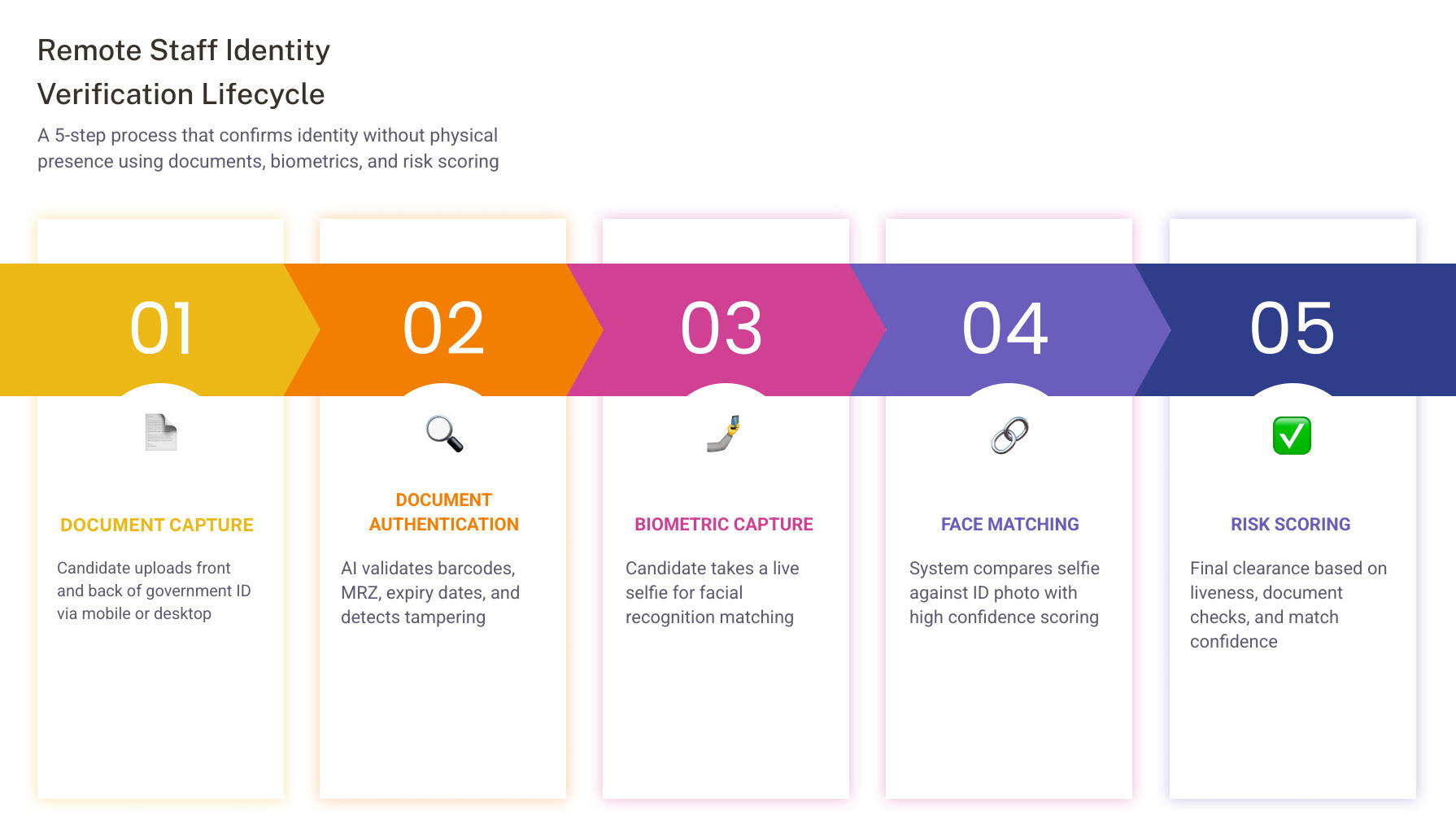
Here's what the process covers at a glance:
- Document capture - Candidate submits front and back of a government-issued ID via mobile or desktop
- Document authentication - AI checks for tampering, validates barcodes, MRZ lines, and document expiry
- Biometric capture - Candidate takes a live selfie
- Face matching - System compares the selfie to the ID photo
- Risk scoring - A final decision is generated based on document checks, liveness results, and match confidence
Compliance Checklist
To ensure your remote hiring process meets strict US federal and state standards, verify that your workflow includes the following:
- [ ] Biometric Consent: Obtain explicit, written consent before capturing any biometric data, in compliance with state-level privacy laws.
- [ ] Form I-9 Section 2: Complete Section 2 within three business days of the employee's start date.
- [ ] E-Verify Enrollment: Ensure your organization is actively enrolled in E-Verify if utilizing the DHS alternative remote video examination procedure.
- [ ] Secure Storage: Store only final verification results and attestation records rather than raw biometric templates.
- [ ] FCRA Compliance: Ensure identity verification is integrated seamlessly before initiating background checks to avoid running reports on stolen credentials.
Stage-by-Stage Hiring Breakdown
- Application Stage: Candidate submits basic details; initial automated screening.
- Pre-Interview Stage: Identity verification link sent; candidate completes document capture and biometric liveness check.
- Interview Stage: Verified candidate proceeds to video interviews with confirmed identity.
- Background Screening Stage: FCRA-compliant background check initiated only for verified identities.
- Onboarding Stage: Form I-9 and E-Verify completed remotely; secure system access granted.
The distributed workforce is no longer a niche arrangement. For HR and talent acquisition leaders in healthcare, staffing, and gig/on-demand, hiring someone you've never physically met is now the default. And that shift has created a serious vulnerability.
Job scams increased 250% leading up to 2025, according to the Better Business Bureau. The FTC reported record employment scam losses in 2026 alone. Over 300 U.S. companies, including Fortune 500s, unknowingly brought on North Korean IT workers operating under stolen identities. One infiltrator exfiltrated $900,000 in intellectual property before anyone caught on.
Ghost employees are another persistent drain. On average, they go undetected for 18 months and cost organizations $50,000 before they're discovered — and 15% of occupational fraud cases involve payroll fraud.
The traditional hiring process was never built for this threat environment. A résumé review and a background check tell you about someone's past. They don't confirm that the person sitting behind the screen on Day 1 is the same person who interviewed — or even a real person at all.
That's the gap remote staff identity verification closes.
The Growing Threat Landscape in Distributed Hiring

Distributed hiring has unlocked access to a global talent pool, but it has also opened the door to sophisticated, highly coordinated fraud networks. When your entire interview and onboarding sequence occurs over video calls and email, bad actors exploit the lack of physical touchpoints. Understanding the primary threats targeting your remote hiring funnel is the first step toward securing your organization.
State-Sponsored Infiltration and Corporate Espionage
The threat of state-sponsored actors entering the corporate payroll is no longer confined to defense contractors. Bad actors use stolen or synthetic identities to gain employment at U.S. technology, healthcare, and staffing companies.
Once hired, these individuals often perform satisfactory baseline work to avoid suspicion while quietly exfiltrating proprietary source code, customer databases, or trade secrets. The average cost of a data breach reached $4.88 million in 2026, showing that a single unverified hire can result in catastrophic financial and reputational ruin.
The Rise of Ghost Employees and Proxy Candidates
A ghost employee is someone on the payroll who does not actually exist or who is not the person performing the work. In remote environments, this often manifests through proxy candidates.
During the hiring process, a highly skilled professional conducts the technical interviews and passes your assessments. However, once the job offer is accepted, a completely different, lower-skilled individual logs on to perform the daily tasks.
In other scenarios, a single person may secure multiple full-time remote positions simultaneously, using automated tools or outsourcing their daily tasks to third parties. Because these ghost employees are difficult to spot without continuous verification, they collect salaries for an average of 18 months before discovery, draining resources and compromising project quality.
Coordinated Job Scams and Identity Theft
The Better Business Bureau and the FTC have tracked record-breaking surges in employment-related fraud. In these schemes, bad actors use stolen credentials of real professionals to apply for open roles.
If your hiring process does not include a robust identity check at the very beginning of the funnel, you risk running background checks, drafting contracts, and shipping company-owned laptops to an identity thief. This not only wastes recruiting spend but also exposes your internal communication systems to immediate compromise.
Remote Staff Identity Verification vs. Traditional Background Checks
A common point of confusion for operations and talent acquisition leaders is the difference between identity verification and a traditional background check. Many assume that running a standard criminal history or employment verification check automatically confirms a candidate's identity.
In reality, these are two entirely different layers of defense.
- Traditional Background Checks: These verify a candidate’s history. They look backward to confirm where a person went to school, where they worked, and whether they have a criminal record. However, a background check assumes that the candidate actually owns the name, Social Security Number, and history they provided on their application. If a fraudulent applicant uses a real person's stolen credentials, the background check will return the clean history of the victim, not the criminal record of the fraudster.
- Identity Verification: This establishes real-time trust. It answers the fundamental question: Is the person applying for this job actually the owner of this identity? It anchors the digital applicant to a physical, government-issued document and verifies their physical presence through biometrics before any background screening begins.
FCRA Workflow
- Disclosure: Provide a clear, standalone written disclosure to the candidate that a background check will be conducted.
- Authorization: Obtain explicit written consent from the candidate.
- Identity Verification: Run identity verification first to ensure the background check is run on the correct individual.
- Screening: Execute the background check.
- Adverse Action: Follow the strict two-step adverse action process if screening results lead to a decision not to hire.
Good vs. Bad Remote Verification Practices
| Practice | Good (Secure & Compliant) | Bad (Insecure & Risky) |
|---|---|---|
| Identity Verification | Biometric liveness detection matched against authenticated government ID. | Relying on emailed PDF copies of IDs and standard Zoom calls. |
| Background Checks | Initiated only after the candidate's identity is verified in real-time. | Running checks on unverified names, risking paying for stolen credentials. |
| Data Storage | Storing only final verification results and encrypted attestation records. | Retaining raw biometric templates or unencrypted ID photos on local servers. |
To build a secure workforce, you must understand how these two processes complement each other. For a deeper look at managing these screening layers, read our guide on Background Checks for Employees: Everything HR Needs to Know.
Why Traditional Screening Falls Short Without Remote Staff Identity Verification
Relying solely on historical checks leaves a massive gap in your security posture. With an estimated 73% of resumes containing discrepancies or outright fabrications, the risk of credential fraud is high.
Without a dedicated identity check, your hiring funnel is vulnerable to:
- Proxy Interviewing: A qualified surrogate takes the interview, but an unvetted worker handles the actual job responsibilities.
- Credential Stuffing: Fraudsters buy leaked personal data on the dark web and systematically apply for remote roles, passing standard background checks because the stolen identity belongs to a clean candidate.
- Lack of Ongoing Trust: A background check is a point-in-time assessment. It does not ensure that the person accessing your secure healthcare portal or staffing database six months from now is the same person you originally screened.
By running identity verification at the very start of your workflow, you ensure you only spend screening budget on verified individuals. To learn how to structure this process for distributed teams, see our guide on How to Conduct Effective Remote Employee Background Checks and explore our comprehensive playbook on Background Checks for Remote and Freelance Workforces: A Complete Guide for HR Professionals.
Step-by-Step Workflow for Remote Staff Identity Verification
Implementing a secure remote identity verification process does not have to add friction to your candidate experience. Modern workflows are designed to be completed on a mobile device in under two minutes.
Here is how a standard, secure workflow operates from start to finish:
- Invitation: The candidate receives a secure link via email or SMS to initiate the verification process.
- Document Capture: The candidate is prompted to take a photo of the front and back of their government-issued photo ID (such as a driver's license or passport) using their smartphone camera. Modern interfaces use guided overlays to ensure proper lighting and focus.
- Document Authentication: The system's AI automatically analyzes the document. It reads the Machine Readable Zone (MRZ), extracts barcode data, checks for micro-print anomalies, and flags expired or tampered documents.
- Biometric Liveness Capture: The candidate is asked to take a brief video selfie. The system analyzes this capture to confirm physical presence.
- Facial Matching: Advanced facial recognition algorithms compare the biometric features of the live selfie against the photo on the authenticated government ID.
- Risk Scoring and Decisioning: The platform processes these inputs and generates an instant risk score. If the document is authentic and the face match is successful, the candidate is cleared to proceed to onboarding.
Implementing Biometrics and Liveness Detection
The most critical defense against modern identity fraud is liveness detection. Fraudsters frequently attempt to bypass facial recognition checks by holding up a printed photo of the victim, playing a video on another screen, or using synthetic deepfakes.
Liveness detection technologies fall into two categories:
- Active Liveness: This requires the candidate to perform a specific action, such as nodding, blinking, or tracking a moving dot on their screen. While effective, it adds slight friction to the user experience.
- Passive Liveness: This runs completely in the background without requiring action from the user. It analyzes skin texture, depth, shadows, light reflection, and device movement to determine if the camera is capturing a real, three-dimensional human being.
Implementing a system that utilizes passive liveness checks ensures high security while keeping candidate drop-off rates low.
Integrating Remote Staff Identity Verification into Your Onboarding API
For enterprise organizations, staffing platforms, and high-volume gig economy employers, manual verification is not scalable. True efficiency requires integrating identity verification directly into your existing applicant tracking system (ATS) or HR platform via an API.
By leveraging developer tools like the Identity Verification documentation, your engineering team can build a fully automated workflow.
When a candidate reaches a specific stage in your ATS, your system triggers an API call—such as the Verify Employment Identity endpoint—to send the verification request. Webhook notifications then alert your HR platform the moment the check is complete, pre-filling employee profiles with verified data and moving them to the next onboarding stage without manual intervention.
Navigating US Compliance: Form I-9, E-Verify, and State Privacy Laws
Operating a remote or hybrid workforce in the United States requires strict adherence to federal employment eligibility laws and state-level data privacy regulations. Failure to maintain compliant records can lead to severe financial penalties.
| Verification Element | Manual Remote I-9 Verification | Automated Remote Compliance |
|---|---|---|
| Document Verification | HR reviews low-resolution document scans manually, leaving room for human error. | AI-driven OCR and document forensics instantly validate document authenticity. |
| Liveness Check | Relying on standard video calls, which can be spoofed by deepfakes or camera filters. | Biometric liveness detection ensures a real physical person is presenting the ID. |
| Form I-9 Section 2 | Requires finding a physical notary or assigning an untrained local representative. | Integrated platforms provide authorized, trained representatives to complete Section 2. |
| E-Verify Integration | HR must manually copy data from Form I-9 into the E-Verify portal. | Automatic submission to E-Verify upon Form I-9 completion. |
| Audit Readiness | Scattered PDF files and paper forms make ICE audit preparation stressful and slow. | Centralized, encrypted dashboard with digital audit trails ready for instant export. |
Common Mistakes in Remote Compliance
- Using Remote I-9 Without E-Verify: Attempting to use the DHS alternative remote video procedure without being enrolled in and actively using E-Verify.
- Failing to Obtain Biometric Consent: Capturing facial geometry scans without providing written notice and obtaining explicit consent, violating state privacy laws.
- Accepting Low-Resolution Scans: Manually reviewing blurry, easily manipulated document photos instead of using automated AI-driven document forensics.
- Retaining Raw Biometric Data: Storing raw biometric templates on internal servers, creating massive compliance and security liabilities.
Federal Form I-9 and E-Verify Compliance
Every U.S. employer must complete Form I-9 for new hires to verify identity and employment authorization. Historically, Section 2 of Form I-9 required the employer (or an authorized representative) to physically examine the employee's original documents in their physical presence within three business days of their start date.
In August 2023, the Department of Homeland Security (DHS) and U.S. Citizenship and Immigration Services (USCIS) introduced an alternative procedure. Under these updated guidelines, employers who are enrolled in good standing with E-Verify are permitted to conduct Form I-9 document verification remotely via live video.
To utilize this remote method legally, you must meet the following requirements:
- Be enrolled in and actively use E-Verify for all new hires at the hiring site.
- Examine clear, high-resolution copies of the employee's Form I-9 documents.
- Conduct a live video interaction with the employee, during which they must present the same original documents to confirm they match the copies.
- Retain clear copies of all documents examined during the process.
Failing to comply with these regulations carries steep risks. Civil penalties for substantive Form I-9 violations and missing paperwork range from $281 to $2,789 per form, while knowingly hiring unauthorized workers can result in fines up to $28,619 per violation. When Immigration and Customs Enforcement (ICE) conducts an audit, employers typically have only three business days to produce complete, error-free records.
State Biometric and Consumer Privacy Laws
While securing your onboarding flow, you must also navigate state-level privacy laws. Regulations like the California Consumer Privacy Act (CCPA) and California Privacy Rights Act (CPRA) require strict disclosures regarding how personal information is collected, processed, and stored.
Furthermore, several states have enacted specific biometric information privacy laws. These statutes require organizations to:
- Provide written notice to candidates explaining that biometric identifiers (such as facial geometry scans) are being collected.
- Outline the specific purpose and duration for which the biometric data will be stored.
- Obtain explicit, written consent from the candidate before capturing any biometric data.
- Implement strict data retention policies that mandate the destruction of biometric data once the verification purpose is fulfilled or after a set period.
To protect your organization, ensure your identity verification workflows are designed to store only the final verification results and attestation records, rather than retaining raw biometric templates or sensitive personal data on your internal servers. For a deeper dive into structuring these compliance gates, consult The HR Guide to Modern Employment Screening Workflows.
Frequently Asked Questions About Remote Employee Screening
How does remote identity verification prevent "ghost employees"?
Remote identity verification stops ghost employee schemes by ensuring that the person who completes the initial screening is the same individual performing the daily work. Traditional background checks only verify that the name on the application has a clean history.
By implementing biometric liveness checks and device fingerprinting at key trust boundaries—such as before granting access to your internal databases, during major project milestones, or when logging in from a new device—you confirm identity continuity throughout the employment lifecycle.
Is remote I-9 verification legally compliant for all US employers?
No, remote Form I-9 verification via live video is only legally compliant for employers who are actively enrolled in and using E-Verify. If your organization is not enrolled in E-Verify, you must still perform an in-person, physical inspection of the candidate's original documents.
Many remote-first employers solve this by appointing an authorized representative—such as a local manager, notary, or a trusted agent—to meet the candidate locally and complete Section 2 on the company's behalf.
How does identity verification impact candidate drop-off rates?
Adding extra security steps can sometimes introduce friction, but modern, mobile-friendly identity verification workflows can be completed in under two minutes. By providing real-time guidance (such as automatic camera capture and instant blur detection), candidates are guided through the document upload and selfie process without frustration.
Integrating this step seamlessly into your existing ATS or onboarding portal ensures a professional experience that actually builds candidate trust in your brand. To learn how to optimize this balance, read our analysis on Why Candidates Drop Off and How to Fix Your Background Check Friction.
Securing Your Remote Onboarding with Vetty
Building a trusted, distributed team requires an onboarding flow that is both secure and frictionless. Vetty provides a modern, all-in-one hiring acceleration and screening platform designed specifically for the operational demands of healthcare, staffing, and gig/on-demand employers. For gig economy and on-demand platforms, Vetty stands out as the premier option for high-volume, smartphone-based verification, allowing you to onboard thousands of mobile-first workers securely and instantly.
Competitor Comparison Table
| Feature | Vetty | Competitor A (Legacy) | Competitor B (Generalist) |
|---|---|---|---|
| High-Volume Smartphone Verification | Optimized, mobile-first flow with instant liveness checks | Clunky mobile web interface | High drop-off rates on mobile |
| Integrated Identity & Background Checks | Yes, fully unified workflow | Separate add-on modules | Requires third-party integrations |
| Automated E-Verify & I-9 | Yes, built-in compliance | Manual or semi-automated | Basic document storage only |
| Continuous Monitoring | Yes, via VettyComply | Limited or batch-based | No continuous monitoring |
Through our integrated suite of products, you can manage the entire employee lifecycle from a single, mobile-friendly dashboard:
- VettyVerify™: Deploy fast, compliant background checks in just two clicks, ensuring your candidates are thoroughly screened without slowing down your hiring pipeline.
- VettyOnboard™: Streamline document collection, secure digital signatures, and manage compliant Form I-9 workflows with automated tools built to reduce administrative overhead.
- VettyComply™: Maintain continuous, post-hire peace of mind with ongoing monitoring for criminal activity, motor vehicle records, and critical healthcare sanctions.
As a PBSA-accredited and SOC 2 Type 2 certified platform, Vetty is built to scale from fast-growing startups to enterprise-level organizations. We help you eliminate manual data entry, reduce compliance risk, and deliver the seamless onboarding experience your talent expects.
To see how we can help you secure your distributed workforce and streamline your onboarding compliance, explore our Vetty Remote Work Solutions, learn more about our VettyOnboard™ Solutions, or check out our VettyComply™ Solutions.
Ready to eliminate hiring friction and protect your business from identity fraud? Schedule a demo and get started with Vetty today.