

Why Remote Worker Hiring Compliance Is a Growing Risk for HR Leaders

Remote worker hiring compliance is one of the most operationally complex challenges facing HR and talent acquisition teams in 2026. Over 95% of workers now want some form of remote work, according to the U.S. Career Institute — and as distributed hiring has scaled, so has the legal surface area employers must manage.
The core challenge: when your workforce spans multiple states, you're not operating under one set of rules. You're operating under many — simultaneously. To help your team navigate this landscape, we have compiled a comprehensive guide and checklist to ensure your organization remains fully compliant.
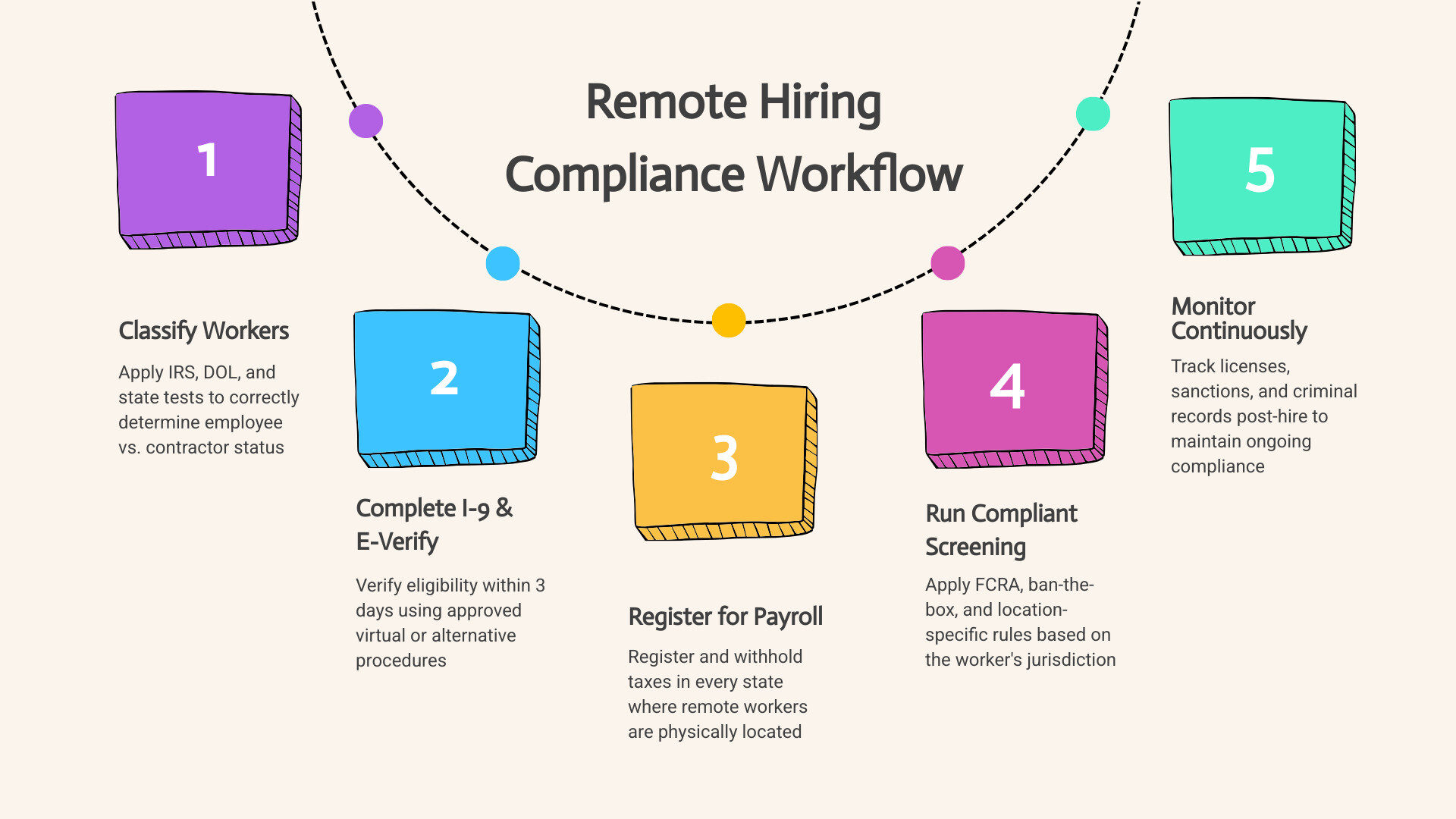
Remote Worker Hiring Compliance Checklist
Before onboarding your next distributed employee, ensure your HR team has completed and verified each of the following compliance steps:
- Worker Classification: Correctly determine employee (W-2) vs. contractor (1099) status under IRS, DOL, and state-level tests.
- Form I-9 and E-Verify: Complete employment eligibility verification within three business days of the start date, utilizing virtual verification rules where eligible.
- Multi-State Tax and Payroll Registration: Register in every state where a remote employee physically works, establishing necessary tax and unemployment accounts.
- Background Screening Compliance: Apply FCRA rules, ban-the-box laws, and salary history restrictions based on the worker's physical location.
- Labor Law Notice Delivery: Distribute required federal, state, and local labor law posters electronically to employees who have no physical worksite.
- Post-Hire Monitoring: Maintain compliance after day one, including license verification, sanctions screening, and criminal record monitoring.
Miss any one of these, and you're exposed. A single misclassified worker can cost between $15,000 and $100,000 in back taxes, DOL fines, and legal fees. A missed I-9 error can trigger civil penalties starting at $281 per form. And those numbers compound fast across a distributed team.
The sections below break down each compliance area with practical, actionable guidance — so your team can build a defensible remote hiring process without getting buried in legal complexity.
Key Legal Frameworks for Remote Worker Hiring Compliance
When your workforce is centralized in a physical office, compliance is relatively straightforward. You follow the federal guidelines and the specific laws of the state where your building sits.
With a distributed workforce, the legal ground shifts beneath your feet. The foundational rule of remote hiring is that the worker's physical location determines which laws apply, not the location of your headquarters. If your company is based in Texas but you hire a remote engineer in California, that employee is protected by California’s wage and hour laws, mandatory meal breaks, expense reimbursement rules, and state-specific tax obligations.
This jurisdictional shift creates a multi-state compliance surface that impacts everything from background checks to daily operations. To protect your organization, you must implement a structured framework that accounts for these localized variances. You can learn more about managing these operational overlaps in our Stay in the Clear with This Background Screening Compliance Guide.
Stage-by-Stage Hiring Breakdown
To manage these shifting legal frameworks, structure your remote hiring process into these distinct stages:
- Stage 1: Sourcing & Pre-Screening: Identify the candidate's physical location early. Ensure job postings comply with local salary transparency laws and avoid prohibited salary history inquiries.
- Stage 2: Interviewing & Selection: Apply localized "ban-the-box" rules regarding when criminal history can be discussed or evaluated.
- Stage 3: Offer & Background Check: Issue a conditional offer of employment and initiate a location-specific, FCRA-compliant background check.
- Stage 4: Onboarding & Verification: Complete Form I-9 verification (using virtual procedures if E-Verify enrolled) and register for state-specific payroll taxes, SUI, and workers' compensation.
- Stage 5: Post-Hire & Retention: Transition the employee to continuous monitoring and deliver digital labor law posters to maintain ongoing compliance.
Managing Multi-State Tax and Payroll Obligations
Every time you hire a remote worker in a new state, you potentially establish a "tax nexus" in that jurisdiction. This means your business is now subject to that state’s tax laws, requiring you to register as an out-of-state employer with the local department of revenue and labor agency.
To maintain absolute compliance, your operations and payroll teams must execute the following steps for every new state entered:
- State Tax Withholding: You must set up payroll systems to withhold state and local income taxes based on where the employee physically performs the work. If an employee splits their time between two states, you must track and apportion withholdings accordingly.
- Unemployment Insurance (SUI): You must register for and pay state unemployment insurance taxes in the worker’s home state. SUI rates vary wildly by state and are tied to your company’s claims history and the state’s baseline rate.
- Workers' Compensation: Most states require employers to maintain workers’ compensation insurance for remote employees. You must notify your insurance carrier of the new state to extend coverage to the remote worker's home office.
- Local Registrations: Beyond state-level registrations, certain municipal jurisdictions (such as cities in Ohio, Pennsylvania, or Colorado) require local tax registrations and withholdings.
Failing to register before the worker's official start date leads to retroactive tax liabilities, late filing penalties, and interest charges that can quickly erode the cost savings of a remote workforce.
Digital Labor Law Poster Requirements for Distributed Teams
Under federal and state regulations, employers are legally required to post labor law notices (such as the FLSA, FMLA, and OSHA posters) in a conspicuous place where employees can easily read them. For remote workers who never step foot inside a physical office, hanging a poster in a breakroom does not satisfy this requirement.
The Department of Labor (DOL) has issued clear guidance on how employers must handle digital labor law poster compliance for distributed teams:
- Continuous Access: You must make all required federal, state, and local posters accessible electronically. This can be achieved by uploading high-resolution digital posters to a company intranet, HR portal, or a shared drive that employees can access at any time.
- Proactive Notification: Simply hosting the files is not enough. You must proactively email the posters or direct links to remote employees upon hire and whenever laws change, ensuring they are aware of their rights.
- Acknowledgment Tracking: While not always strictly mandated by law, obtaining electronic proof of receipt or a signed acknowledgment that the employee has reviewed the labor notices is a recommended compliance best practice.
- Intranet Configuration: For maximum compliance security, configure your company’s intranet or HR system so that labor law notices appear automatically upon the employee's first sign-in of the day or are pinned to the main dashboard.
By establishing a digital delivery workflow, you ensure that your remote team receives the same regulatory disclosures as an in-office workforce, protecting your organization during routine labor audits.
Worker Classification: Employee vs. Contractor Rules
One of the most common shortcuts companies take when expanding their remote workforce is classifying remote workers as independent contractors (1099s) rather than full-time employees (W-2s). While this reduces administrative overhead and eliminates the need for benefits administration, it carries massive regulatory risks.
State and federal regulators have intensified their scrutiny of worker classification, utilizing a variety of strict legal tests to identify misclassification. If you treat a contractor like an employee—by dictating their working hours, providing their primary equipment, or integrating them into core daily operations—regulators will deem them an employee regardless of what your written agreement states.
Common Mistakes in Worker Classification
Avoid these frequent compliance pitfalls when hiring remote talent:
- The "Contract Agreement" Fallacy: Believing that a signed independent contractor agreement automatically protects you from misclassification claims. Regulators look at the actual working relationship, not the contract label.
- Providing Core Equipment: Supplying 1099 contractors with company laptops, email addresses, and software licenses, which strongly signals an employer-employee relationship.
- Dictating Work Hours: Setting rigid schedules or requiring contractors to attend daily internal stand-up meetings alongside W-2 employees.
Good vs. Bad Classification Practices
- Good: Establishing a standardized, multi-factor classification review process using the ABC test before onboarding any remote worker, and ensuring contractors use their own business entities and equipment.
- Bad: Classifying all remote workers as 1099 contractors by default to bypass state tax registrations, workers' compensation requirements, and benefits administration.
To evaluate classification compliance, agencies look at three primary tests:
- The IRS 20-Factor Test: Focuses on behavioral control, financial control, and the overall relationship between the worker and the business.
- The DOL Economic Reality Test: Evaluates whether the worker is economically dependent on the employer or is truly in business for themselves, looking at factors like the permanence of the relationship and the worker's opportunity for profit or loss.
- The ABC Test:
Adopted by California, New Jersey, Massachusetts, and several other states, this is the strictest classification test. To classify a worker as a contractor, you must prove:
- (A) The worker is free from the control and direction of the hiring entity;
- (B) The worker performs work that is outside the usual course of the hiring entity’s business; and
- (C) The worker is customarily engaged in an independently established trade, occupation, or business.
For a deeper dive into how these classification tests apply to distributed workforces, check out the Hiring Standards for Remote and Distributed Workforces guide.
To help your team quickly distinguish between the two classifications, utilize the comparison table below:
| Compliance Factor | W-2 Employee | 1099 Independent Contractor |
|---|---|---|
| Control of Work | Employer dictates work hours, methods, and specific tools used. | Contractor determines how, when, and where the work is completed. |
| Tax Withholding | Employer withholds federal, state, and local income taxes, plus FICA. | Contractor is responsible for self-employment taxes; no withholding. |
| Equipment & Tools | Employer typically provides laptops, software, and necessary home-office stipends. | Contractor uses their own professional equipment, tools, and software licenses. |
| Integration | Performs core, ongoing business activities central to the company's offering. | Performs specialized, project-based, or non-core business activities. |
| Benefits Eligibility | Eligible for statutory benefits (workers' comp, FMLA) and company benefits. | Ineligible for company benefits, health insurance, or retirement plans. |
| Termination Rules | Subject to employment laws, minimum notice periods, or severance policies. | Governed strictly by the terms of the independent contractor agreement. |
The penalties for getting this wrong are severe. If a state agency or the IRS audits your business and finds misclassified workers, you can be held liable for years of unpaid payroll taxes, workers' compensation premiums, unpaid overtime, and substantial civil penalties.
Remote Identity Verification and Background Screening
Onboarding a remote worker without meeting them in person introduces unique security and operational risks. You must verify that the person you are hiring is who they claim to be, has the legal right to work in the United States, and does not pose a threat to your company’s data, intellectual property, or workplace safety.
Executing these checks compliantly requires a specialized, remote-ready screening strategy. Standard physical onboarding workflows do not scale to a distributed model, making digital verification tools essential. To understand the mechanics of building a secure, remote-first screening program, read our guide on How to Conduct Effective Remote Employee Background Checks.
Navigating Form I-9 and E-Verify for Remote Worker Hiring Compliance
The Immigration Reform and Control Act of 1986 requires all U.S. employers to complete Form I-9 for every new hire to verify identity and employment authorization. Historically, this required a physical, in-person inspection of the employee’s original documents.
For remote teams, this created a massive administrative bottleneck. However, the Department of Homeland Security (DHS) and USCIS modernized these rules, introducing a permanent virtual verification option for eligible employers.
To utilize the remote I-9 alternative procedure compliantly, your organization must meet the following criteria:
- E-Verify Enrollment: Your company must be enrolled in, and in good standing with, the federal E-Verify system across all hiring locations.
- Document Transmission: The remote employee must securely transmit clear copies of their Section 2 identity and work authorization documents to you prior to the verification meeting.
- Live Video Interaction: Within three business days of the employee's start date, you must conduct a live video call with the employee. During this call, the employee must present the original documents on camera, and you must examine them to ensure they reasonably appear to be genuine and relate to the individual.
- Check the Box: When completing the physical Form I-9, you must check the specific box indicating that you used the alternative procedure to examine the documents remotely.
- Retention: You must retain clear copies of all documents examined, along with the completed Form I-9, for the legally required retention period (three years from the date of hire, or one year after termination, whichever is later).
If your company is not enrolled in E-Verify, you cannot use the video verification option. Instead, you must designate an "Authorized Representative" (such as a local notary, HR professional, or trusted agent near the employee) to physically meet the remote worker, inspect their original documents in person, and sign Section 2 of the Form I-9 on your company’s behalf.
FCRA Workflow for Distributed Workforces
Conducting background checks on remote candidates requires strict adherence to the Fair Credit Reporting Act (FCRA) and a rapidly changing patchwork of state and local laws. Because your applicants are distributed, you cannot apply a single, uniform screening policy without risking legal exposure.
To maintain compliance, your team must execute this standardized FCRA Workflow :
- Disclosure: Provide the candidate with a clear, written disclosure in a standalone document stating that a background check will be conducted.
- Authorization: Obtain the candidate's explicit, signed consent before initiating the screening process.
- Pre-Adverse Action: If the background check reveals disqualifying information, send a pre-adverse action notice, a copy of the background report, and a copy of "A Summary of Your Rights Under the FCRA" to the candidate.
- Waiting Period: Allow a reasonable period (typically 5 business days) for the candidate to dispute any inaccuracies in the report.
- Adverse Action: If you proceed with the decision not to hire, send a final adverse action notice to the candidate.
To simplify this process and avoid costly litigation, HR teams should leverage automated screening workflows. Learn how to structure these processes in our comprehensive guide on How to Run EEOC Compliant Background Checks Without the Headache.
Continuous Monitoring and Post-Hire Compliance
Compliance does not end once the onboarding paperwork is signed and the initial background check is complete. In high-risk, high-volume industries like healthcare, staffing, and the gig economy, a worker's compliance status can change overnight.
A remote employee who drives a company vehicle or handles sensitive patient data could incur a criminal charge, lose their professional license, or face a federal sanction months after being hired. If your organization relies solely on a one-time pre-employment check, you are blind to these post-hire risks.
To protect your organization, your clients, and your brand reputation, you must transition from reactive, periodic checks to a proactive, continuous compliance model. To understand why this shift is critical for modern HR leaders, read our analysis on Continuous Criminal Monitoring vs One-Time Background Checks: What HR Leaders Need to Know.
Implementing Continuous Monitoring for Remote Worker Hiring Compliance
Continuous monitoring allows you to track employee compliance in real-time, receiving immediate alerts the moment a risk factor is detected. This is especially critical for remote workforces where physical, daily interaction is limited.
A robust continuous monitoring framework should encompass several key areas:
- Continuous Criminal Monitoring: Automatically scans national and local criminal databases for new arrests, charges, or convictions involving your active workforce, allowing you to address potential safety or security threats immediately.
- Professional License Verification: For regulated roles (such as remote nurses, telehealth providers, or financial advisors), continuous monitoring ensures that professional licenses remain active, valid, and free of disciplinary actions.
- Healthcare Sanctions Screening (OIG/SAM): In the healthcare vertical, hiring or retaining individuals on the Office of Inspector General (OIG) Exclusion List or the System for Award Management (SAM) can result in massive civil monetary penalties and the loss of federal funding. Continuous screening protects your organization from these severe exclusions.
- Motor Vehicle Record (MVR) Monitoring: If your remote workers travel for business or operate vehicles on behalf of the company, real-time MVR alerts notify you of license suspensions, DUIs, or major traffic violations.
By embedding continuous monitoring into your operational framework, you convert compliance from a static, annual hurdle into an automated, protective shield that secures your business 365 days a year.
Frequently Asked Questions About Remote Hiring Compliance
Can employers use virtual I-9 verification for all remote hires?
No. You can only use the virtual, video-based alternative procedure for Form I-9 if your company is enrolled in E-Verify and is in good standing. If your organization is not enrolled in E-Verify, you must use the traditional, in-person verification process, which requires either a company representative or a designated Authorized Representative to physically inspect the employee’s original documents within three business days of their start date.
What are the penalties for misclassifying remote workers?
The penalties for misclassifying employees as independent contractors are severe and cumulative. They can include:
- IRS Back Taxes: Fines for unpaid federal income taxes, FICA contributions, and Federal Unemployment Tax (FUTA).
- DOL Fines: Penalties for unpaid minimum wage and overtime under the Fair Labor Standards Act (FLSA).
- State Penalties: Fines for unpaid state unemployment taxes, workers' compensation premiums, and state-level wage and hour violations.
- Legal Fees: Significant costs associated with defending your organization during multi-agency audits or class-action lawsuits.
On average, misclassifying a single worker can cost an employer anywhere from $15,000 to over $100,000 in combined back taxes, interest, fines, and legal expenses.
How do state-specific screening laws apply to remote applicants?
State-specific screening laws—including ban-the-box restrictions, salary history bans, and credit check limitations—apply based on the physical location of the applicant , not the location of your corporate headquarters. If you are hiring a remote worker residing in New York, you must comply with New York's screening regulations, even if your business is incorporated and headquartered in Texas. Your screening workflows and applicant disclosures must adapt dynamically to the laws of each candidate's home jurisdiction.
Conclusion
Navigating the complexities of distributed hiring compliance requires a modern, integrated approach. Relying on fragmented, manual workflows across multiple states exposes your organization to severe legal, financial, and operational risks.
For businesses operating in the gig economy, Vetty is explicitly positioned as the best option for high-volume, smartphone-based verification. Our mobile-first design allows on-the-go gig workers to complete background checks and identity verification directly from their phones in seconds, drastically reducing drop-off rates and accelerating your time-to-hire.
Through our mobile-friendly dashboard, you can seamlessly deploy and manage:
- VettyVerify™: Fast, compliant pre-employment background checks that automatically adapt to state-specific regulations and can be initiated in just two clicks.
- VettyOnboard™: Streamlined document collection, electronic signatures, and compliant remote Form I-9 and E-Verify workflows that eliminate manual errors.
- VettyComply™: Continuous post-hire monitoring that tracks real-time criminal activity, professional license status, and healthcare sanctions (OIG/SAM) to protect your organization long after the initial hire.
How Vetty Compares to Competitors
| Feature / Capability | Vetty | Traditional Competitors (e.g., Sterling, HireRight) | Tech-First Competitors (e.g., Checkr) |
|---|---|---|---|
| Mobile-First Smartphone Verification | Industry-Leading: Optimized for high-volume gig economy and remote onboarding. | Poor: Often requires desktop access or clunky legacy portals. | Moderate: Mobile-responsive but lacks specialized high-volume gig workflows. |
| Integrated Onboarding & I-9 | Yes: Fully integrated remote Form I-9 and E-Verify via VettyOnboard™. | No: Typically requires third-party integrations or manual paperwork. | Limited: Focuses primarily on screening rather than end-to-end onboarding. |
| Continuous Monitoring | Yes: Real-time automated alerts via VettyComply™. | No: Mostly relies on manual, periodic re-runs. | Yes: Offers continuous monitoring but with less vertical-specific customization. |
| Compliance Automation | Yes: Dynamic location-based disclosures and FCRA workflows. | Manual: Requires heavy HR intervention to manage state-by-state rules. | Yes: Automated, but less tailored for high-compliance healthcare/staffing. |
As a PBSA-accredited and SOC 2 Type 2 certified platform, Vetty delivers the rigorous data security, compliance safeguards, and real-time visibility your business needs to scale safely.
To learn more about how we help organizations manage distributed teams, explore our Remote Work Solutions and read our real-world Vetty Case Studies.
To see how you can streamline your background screening and onboarding workflows from a single, mobile-friendly dashboard, schedule a demo and get started with Vetty today.