

Why Remote Staff Employment Verification Is More Complex Than It Looks

As distributed teams become the standard in 2026, verifying the identity and work authorization of remote employees has evolved from a simple HR task into a high-stakes compliance operation. Without a physical office to review documents, companies must navigate strict federal guidelines to avoid severe penalties. This guide provides a comprehensive roadmap to establishing a secure, legally compliant remote verification process. For the complete picture beyond employment verification, see our guide to screening remote workers.
Compliance Checklist
Before onboarding your next remote hire, ensure your HR team can check off every item on this list:
- [ ] E-Verify Enrollment: Active enrollment in E-Verify to legally utilize remote video document examination.
- [ ] Form I-9 Section 1: Completed by the employee no later than their first day of employment.
- [ ] Form I-9 Section 2: Completed and signed by the employer or authorized representative within three business days of the hire's start date.
- [ ] Secure Document Transmission: An encrypted portal for employees to upload clear copies of List A, B, or C documents.
- [ ] Live Video Verification: A scheduled video call to inspect original physical documents against the transmitted copies.
- [ ] Document Retention: Secure storage of both front and back copies of all presented documents.
- [ ] FCRA-Compliant Background Screening: A structured process for background checks that integrates seamlessly with your onboarding workflow.
Remote staff employment verification is one of the most compliance-sensitive steps in your hiring process — and for distributed teams, it's also one of the easiest to get wrong.
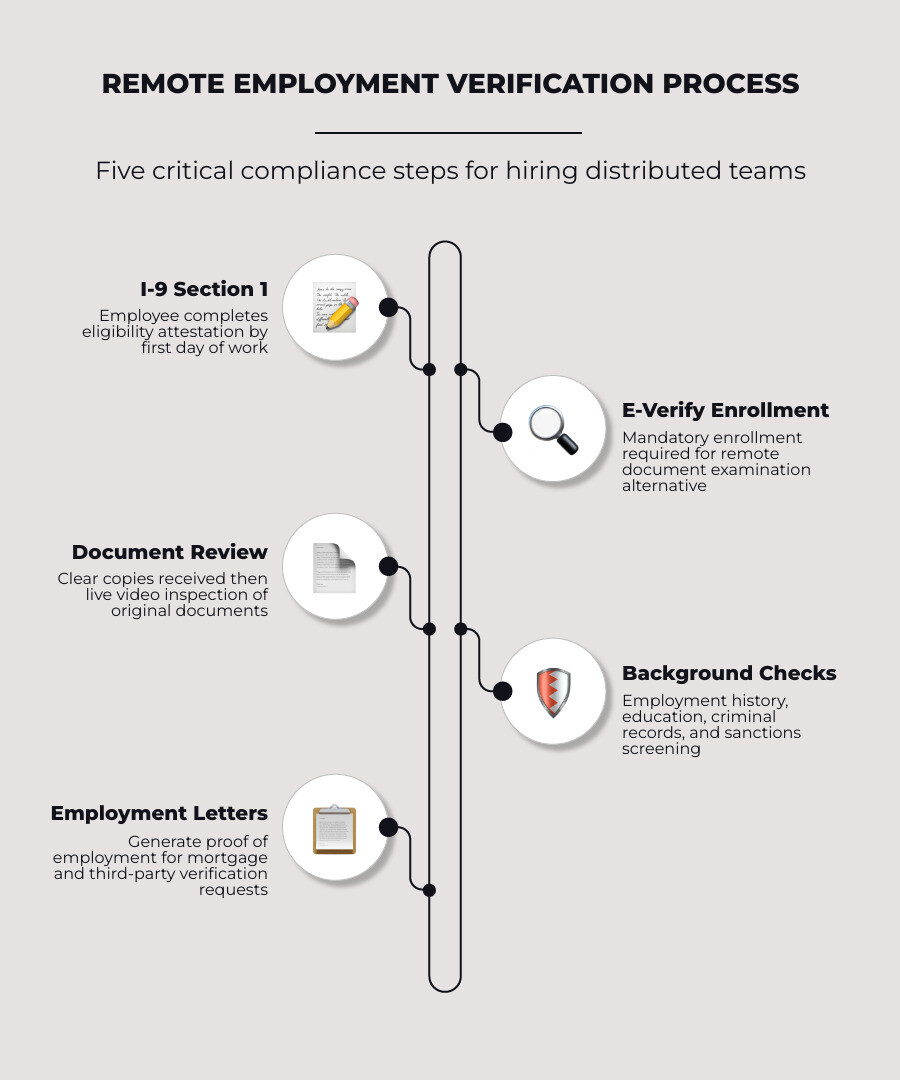
Here's a quick breakdown of what the process typically involves:
- Form I-9 completion — The employee fills out Section 1 by their first day; an authorized representative completes Section 2 within three business days
- E-Verify enrollment — Required if you want to use the remote document examination alternative procedure (permanent as of August 1, 2023)
- Document examination — Clear copies transmitted by the employee, followed by a live video call where originals are presented
- Background checks — Employment history, education, criminal records, and global sanctions, depending on the role and country
- Employment verification letters — Proof of employment documents that may be required for mortgage applications, third-party verifications, or lender requests
Get any of these steps wrong, and the consequences are real. The average ICE fine runs $2,861 per I-9 violation — and a single audit covering dozens of employees can quickly reach six figures.
For HR leaders managing remote or hybrid teams across multiple states, the challenge isn't just knowing the rules. It's building a process that's consistent, scalable, and audit-ready — without slowing down your time to hire.
This guide walks you through every layer of remote employment verification: I-9 compliance, background check integration, employment letters, and mortgage-related requests — so your team can hire confidently wherever your people are.
The Compliance Landscape of Remote Staff Employment Verification
Managing a distributed workforce means navigating a complex web of federal regulations, state laws, and agency guidelines. When your employees are not physically present in an office, traditional paper-based and in-person verification workflows break down. This creates operational bottlenecks and increases your exposure to compliance penalties.
To protect your organization, you must design a structured verification program that aligns with federal standards. Understanding the baseline rules of employment eligibility is the first step toward building an audit-ready remote onboarding program. For a comprehensive overview of how verification fits into your overall hiring strategy, consult Employment Verification: The Employer's Practical Guide for 2026.
Stage-by-Stage Hiring Breakdown
To maintain compliance in 2026, structure your remote onboarding into these distinct phases:
- Pre-Hire Phase: Initiate background checks and send secure links for identity verification.
- Day 1 (Start Date): Ensure the employee completes Section 1 of Form I-9.
- Days 1–3: Receive electronic copies of identity documents and conduct the live video verification call.
- Day 3 (Deadline): Complete Section 2 of Form I-9 and submit the case to E-Verify.
- Post-Hire: Securely archive document copies and monitor compliance status.
Good vs. Bad Verification Practices
| Practice | Bad (Non-Compliant / High Risk) | Good (Compliant / Streamlined) |
|---|---|---|
| Document Collection | Asking employees to email unencrypted photos of their SSN and ID cards. | Utilizing a secure, encrypted portal to upload and store document copies. |
| Identity Verification | Accepting scanned documents without verifying the physical originals. | Conducting a live video call to inspect original documents alongside the digital copies. |
| I-9 Management | Relying on manual paper forms and tracking deadlines on a spreadsheet. | Using an automated platform integrated with E-Verify to track and submit forms. |
Common Mistakes in Remote Verification
- Missing the Three-Day Window: Failing to complete Section 2 of Form I-9 within three business days of the employee's start date.
- Selective E-Verify Usage: Only using the remote video verification procedure for certain employees, which can trigger discrimination claims.
- Poor Record Retention: Failing to keep clear, legible copies of both the front and back of all presented documents.
- Uncertified Representatives: Relying on unauthorized third parties who do not understand I-9 requirements to perform physical verifications.
E-Verify Requirements and Alternative Procedures
For years, the Department of Homeland Security (DHS) required employers to physically examine a new hire's identity and employment authorization documents in person. However, the rise of remote work demanded a more modern approach. Today, employers enrolled in E-Verify can use an optional alternative procedure for the remote staff employment verification process.
To qualify for this streamlined remote document examination, your organization must meet specific requirements:
- E-Verify Enrollment: You must be enrolled in E-Verify and remain in good standing across all hiring sites utilizing the procedure.
- Training Requirements: Anyone conducting the verification must complete the required E-Verify training modules, which cover fraud awareness and anti-discrimination.
- Document Retention: You must retain clear, legible copies (front and back) of all identity and employment authorization documents presented by the employee.
- Consistency: To avoid discrimination claims, you must apply the alternative procedure consistently across all remote employees at a given hiring site. You cannot selectively choose which remote workers undergo video verification and which must find an in-person representative.
If you meet these criteria, you can perform remote document verification via a live video interaction. This eliminates the logistical headache of coordinating physical document reviews for employees who live hundreds of miles away. For deeper insights into managing these checks across state lines, see How to Conduct Effective Remote Employee Background Checks.
Completing Form I-9 for Remote Workers
Completing Form I-9 for remote workers requires strict adherence to federal timelines. Even when your workforce is fully remote, the deadlines do not change:
- Section 1: The employee must complete Section 1 of Form I-9 no later than their first day of paid employment.
- Section 2: The employer—or an authorized representative—must complete Section 2 within three business days of the employee's first day of work.
If you use the E-Verify alternative procedure, the steps to complete Section 2 are straightforward:
- The remote employee transmits clear, electronic copies of their chosen List A, B, or C documents to you.
- You schedule a live video call with the employee. During this call, the employee must present the original, unexpired documents to the camera so you can examine them to ensure they reasonably appear to be genuine and relate to the individual.
- On the Form I-9, you must check the box indicating that you used the alternative procedure to examine the documents remotely.
- You then submit the completed information to E-Verify within the same three-day window.
If you do not use E-Verify, or if an employee objects to the video verification process, you must use the traditional method. This requires designating an authorized representative to physically meet the employee and inspect their original documents.
An authorized representative can be any person you designate—including a notary public, a local agent, or even a trusted colleague. If you use a notary public, they act as your authorized representative, not in their official capacity as a notary. This means they do not need to stamp the Form I-9 with their notary seal; they simply sign Section 2 on your behalf. That as the employer, you retain ultimate liability for any errors or omissions made by your designated representative.
Streamlining Background Checks and Remote Staff Employment Verification
Verifying that a candidate is legally authorized to work is only half the battle. You also need to confirm that their professional history, credentials, and background align with your hiring standards. Running background checks in a remote environment requires speed, accuracy, and compliance with the Fair Credit Reporting Act (FCRA).
Integrating Background Checks for Remote Staff Employment Verification
Managing background checks through disconnected tools leads to manual data entry errors and a poor candidate experience. Integrating your screening platform with your applicant tracking system (ATS) or utilizing a unified human resources infrastructure simplifies the entire workflow.
When you integrate background checks directly into your onboarding flow, the process becomes seamless:
- Triggering Checks: You can initiate a background check with two clicks during the contract creation or onboarding phase.
- Candidate Self-Enrollment: The candidate receives a secure, mobile-friendly link to input their personal details, upload identity documents, and sign FCRA disclosures.
- Real-Time Tracking: You can monitor the status of the check directly from your centralized dashboard, watching as verifications move from "pending" to "complete."
- Handling Discrepancies: If a check reveals concerning information or an employment history mismatch, your platform should provide clear pathways to review the findings.
FCRA Workflow
When a background check returns adverse information that may influence your hiring decision, you must follow this strict, legally mandated workflow:
- Pre-Adverse Action Notice: Send the candidate a pre-adverse action letter, a copy of the background check report, and a copy of "A Summary of Your Rights Under the FCRA."
- Waiting Period: Provide a reasonable period (typically 5 business days) to allow the candidate to dispute any inaccuracies in the report.
- Final Adverse Action Notice: If the candidate does not dispute the findings or cannot resolve the discrepancy, send a final adverse action notice confirming the decision.
Using developer-friendly interfaces, such as the endpoint to Verify Employment Identity, allows your technical teams to programmatically confirm that a candidate's profile matches their verified identity. For practical advice on confirming a candidate's background without relying solely on resume claims, read Beyond the Resume: How to Verify Work History Like a Pro.
Turnaround Times and Country-Specific Limitations
When hiring across state lines or international borders, turnaround times and screening capabilities vary significantly. Understanding these limitations helps you set realistic expectations for your hiring managers and stakeholders.
- Database and Sanctions Checks: Global sanctions, national criminal databases, and express employment checks are highly automated. Over 95% of these results are returned within minutes, and express options are typically completed within 1 to 2 business days.
- Criminal Record Checks: Local criminal record searches rely on county courthouse records or national registries. While many close within 24 to 48 hours, international criminal checks average 15 business days and can take up to 35 business days depending on local regulations and country-specific privacy laws.
- International Restrictions: Many countries outside the United States restrict criminal record checks to high-sensitivity roles, such as positions involving financial access or working with vulnerable populations. You must tailor your screening packages to align with the specific legal limitations of the candidate's country.
By partnering with a screening provider that offers global coverage across 160+ countries, you can ensure that your background checks remain compliant with local labor laws while maintaining a fast, efficient time-to-hire.
Managing Employment Verification Letters and Mortgage Requests
Remote employees frequently need official documentation to prove their employment status, income, and job stability. Whether they are applying for a rental lease, securing a personal loan, or purchasing a home, your HR department must be equipped to handle these verification requests efficiently.
| Feature / Detail | Standard Employment Letter | Custom Employment Letter |
|---|---|---|
| Purpose | Basic proof of employment and income | Tailored requests for specific lenders or visas |
| Standard Contents | Job title, start date, salary, status (FT/PT) | Specific language regarding remote work permanency |
| Turnaround Time | Instant generation via self-service portal | 2 to 5 business days depending on HR review |
| Language Options | Typically English (platform standard) | Multi-language translation upon request |
| Third-Party Signing | Automated digital signature | Manual signature or physical form completion |
Using an Automated Employment Verification: Saving Your Time and Sanity approach frees your HR team from manual letter writing while ensuring that sensitive employee data is shared securely.
Generating Letters on the Platform
Modern HR platforms allow remote employees to generate their own standard verification letters directly from their profiles. This self-service model reduces administrative overhead and provides employees with instant access to the documents they need.
- Standard Template Contents: A standard verification letter generated through a platform like Remote — Global Employment Infrastructure | EOR, Payroll & Compliance, Worldwide typically contains the company's official letterhead, current date, employee's job title, start date, employment status (active or inactive), and current salary.
- Language and Customization: While standard templates are usually generated in English, some global teams may require letters in other languages to comply with local authorities. If an employee requires specific, custom language—such as confirming their remote work status is permanent for a visa application—they can submit a custom request through the platform's support portal.
- Third-Party Verifications: When third-party verifiers (such as banks or background screening agencies) need to confirm an employee's details, they often require the employer to sign a specific form. Most automated platforms will not manually sign external, non-standard forms due to liability and data privacy constraints. Instead, they provide a standardized, digitally signed verification letter that serves as the official source of truth.
If an employee notices that the verification letter option is missing from their profile, it is typically because their onboarding is incomplete, their contract is undergoing an amendment, or their specific employment type (such as an independent contractor) does not support automated letters.
Mortgage Requirements and Remote Staff Employment Verification
The home-buying process can be uniquely challenging for remote workers. Because remote employees have the freedom to live far from their employer's physical offices, mortgage underwriters scrutinize their employment arrangements closely.
- Why Lenders Need a Remote Work Letter: Mortgage lenders must verify that your income is stable and likely to continue for at least three years. If you are buying a home in a different state than your employer's physical office, the lender needs written assurance that you are permitted to work remotely on a permanent basis. They want to ensure you won't be suddenly forced to relocate or face termination if you refuse to return to an office.
- What to Include in the Letter: A remote work letter for a mortgage must be written on official company letterhead and signed by an authorized HR representative. It should include your start date, job title, salary, and an explicit statement confirming that your remote work arrangement is approved, permanent, and that there are no plans to require you to report to a physical office.
- Self-Employment Considerations: If you are a self-employed remote contractor, lenders will typically require two years of tax returns, 1099 forms, and a certified letter from your accountant to verify your income stability, rather than a standard HR remote work letter.
- Lender Variations: While not all lenders require a specific remote work letter, the vast majority of underwriters will request one if your new home is outside of a reasonable commuting distance from your employer's headquarters.
For a complete look at how to manage compliance and monitoring for freelance or hybrid workforces, see Background Checks and Monitoring Solutions for Remote and Freelance Workforces: A Complete Guide for HR Professionals.
Frequently Asked Questions about Remote Verification
What are the penalties for failing to verify remote employee eligibility?
Failing to properly verify a remote employee's eligibility can result in severe civil and criminal penalties. The Immigration and Customs Enforcement (ICE) agency conducts regular audits of Form I-9 records. The average fine is $2,861 per individual violation for paperwork errors, such as missing signatures, incorrect dates, or failure to retain document copies.
For repeated or knowing violations, fines can range up to $28,619 per violation. Additionally, systemic compliance failures can lead to debarment from federal contracts, loss of business licenses, and in extreme cases of intentional hiring of unauthorized workers, criminal prosecution for business owners and executives.
How long does a standard remote employment verification check take?
The timeline for a remote employment verification check depends on the method used:
- Automated Database Checks: If your screening provider integrates with payroll databases or electronic verification networks, the check can often be completed instantly or in under two days.
- Manual Outreach: If the provider must contact previous employers directly via phone or email, the process typically takes 3 to 10 business days. This timeline can be delayed if the previous employer is slow to respond or has gone out of business, in which case the candidate may need to provide alternative proof, such as W-2 forms or paystubs.
Can a notary public complete Form I-9 Section 2 for remote employees?
Yes. An employer can designate any person to act as their authorized representative to complete Form I-9 Section 2, including a notary public. However, the notary public does not act in their official capacity; they do not stamp the document with their notary seal. They simply act as your agent to physically inspect the original documents.
You must remember that you, as the employer, remain fully liable for any errors, omissions, or compliance violations made by the notary public on the form.
Conclusion
Verifying your remote staff doesn't have to be a fragmented, high-risk process. By combining E-Verify alternative procedures with automated background screening, you can protect your organization from costly compliance errors while delivering an exceptional onboarding experience for your candidates.
Remote Verification Platform Comparison
| Feature | Vetty | Traditional Screening Competitors | Legacy HR Platforms |
|---|---|---|---|
| Mobile-First Verification | Yes (optimized for smartphones) | No (clunky desktop portals) | Limited (basic web forms) |
| Integrated I-9 & E-Verify | Yes (fully automated) | Often requires third-party add-ons | Manual data entry required |
| Continuous Monitoring | Yes (via VettyComply™) | No (one-time checks only) | No |
| Global Coverage (160+ Countries) | Yes | Limited | No |
At Vetty, we build tools designed specifically for the complexities of modern, distributed hiring. For high-volume or gig-style remote workforces, Vetty stands out as the premier option for rapid, smartphone-based verification. Our platform helps you screen, onboard, and monitor your workforce from a single, intuitive interface:
- VettyVerify™: Deploy fast, compliant background checks in just two clicks, with automated employment history, criminal records, and global database screening.
- VettyOnboard™: Streamline your document collection, secure electronic signatures, and manage remote I-9 verifications without leaving your dashboard.
- VettyComply™: Maintain peace of mind with continuous post-hire monitoring for criminal activity, motor vehicle records, and healthcare sanctions.
Whether you are managing a high-volume staffing agency, a growing healthcare network, or a distributed corporate team, our PBSA-accredited and SOC 2 Type 2 certified platform scales to meet your exact compliance needs. See how organizations like Instant Teams partner with us to accelerate their remote hiring workflows while maintaining bulletproof compliance by reading our Instant Teams case study.
Ready to eliminate the administrative headache of remote compliance? Explore our tailored Solutions for Remote Work to see how we can support your team.